
How to Ban Another Model on Stripchat
Stripchat doesn't provide an option to block all models from entering your room. However, you can ban individual models or users, preventing specific accounts from entering your room.
You don't need to wait for the person to enter your room first. You can ban them directly using Stripchat's messaging system.
Visual guide
Step 1 of 3
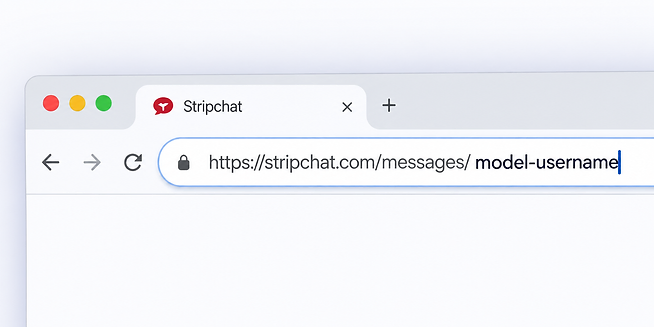
Step 1 — Open the model's message URL
Add the model's username to the end of stripchat.com/messages/ and open the completed URL.
How to ban a model or user from your Stripchat room
1. Open a message with the account
Go to:
Add the username of the model or user you want to ban to the end of the URL.
For example, if their username is Jess, you would visit:
https://stripchat.com/messages/Jess
Alternatively, use the tool below. Enter the Stripchat username you'd like to ban and we'll generate the correct link for you.
Username link generator
Enter the Stripchat username and we'll build the message link for you.
2. Wait for the chat window to appear
After opening the link, wait a few seconds. A chat window for that account should appear.
You don't need to send them a message.
3. Open the account options
Click the three dots at the top of the chat window to open the available options for that account.
4. Select Ban User
Choose Ban User.
The account will then be banned from your room.
Can I ban all other models from my Stripchat room?
No. Stripchat doesn't currently provide an option to automatically prevent every other model from entering your room.
If there's a particular model or user you don't want accessing your room, you'll need to ban that account individually using the steps above.